 AVICENNA
Discord Integration
Trigger dynamic Discord messages and remotely monitor your API's status!
Discord is a messaging platform that is popular within the developer world as well as Avicenna's own community (our communications/support is based in our Discord server!). Today, we're excited to introduce a brand-new Discord integration for Avicenna.
This new integration offers a lot of potential, and we're kicking it off with two primary features. First, you can send messages to Discord directly from your endpoint's logic tree; and second, you can use the integration's built-in Discord slash commands to monitor your API's status (and soon, analytics too)!
How It Works
To get started, head to the Settings page on your Dashboard and click Connect for the Discord integration. You'll be prompted to authorize an application with access to your Discord server.
Once your server is connected, you can use the Send Discord Message action in the Workshop with a custom message and Discord channel ID.
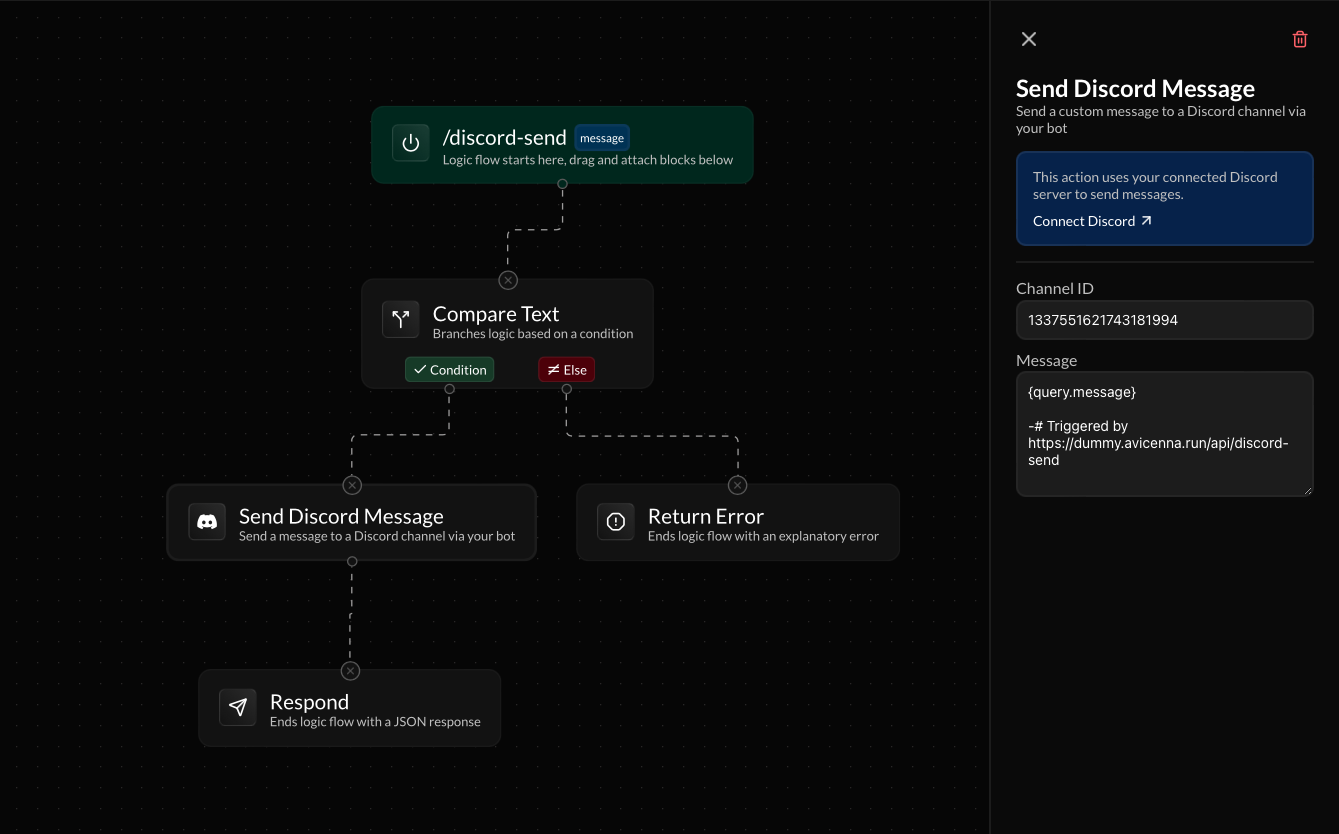 Example use of the Send Discord Message action block in an endpoint flow
Full documentation on how to use the Send Discord Message action and what its output look like is available in the Avicenna Docs.
As always, feel free to join the Avicenna's official Discord server for quick human support, bug reporting, and feature requests!